

Parse converts documents into clean, LLM-ready data. Upload a file to
/parse — or point /scrape
at a public document URL — and get back markdown, per-page content, typed
layout blocks, or structured JSON.
- Layout-aware: headings, paragraphs, tables, and formulas assembled in reading order
- Scans included: native text extraction with OCR fallback for image-only pages
- Grounded structure: typed layout blocks with bounding boxes and character-span links into the markdown (PDFs)
- Any common format: PDF, Word, Excel, PowerPoint, OpenDocument, EPUB, CSV, HTML
- Zero Data Retention support
Quickstart#
Have a public document URL instead of a file? /scrape
detects the file type and parses it identically — same options, same output:
firecrawl.scrape("https://example.com/report.pdf").
Response#
SDKs return the document object directly. cURL returns the JSON payload.
numPages is the number of pages actually parsed; totalPages is the document's
true page count. They match unless maxPages truncated the result — e.g. parsing
a 100-page PDF with maxPages: 10 returns numPages: 10 and totalPages: 100, so
totalPages > numPages tells you the output was truncated. totalPages is omitted
when the page count can't be determined.
Beyond the document markdown, three outputs cover the cases where a single markdown string isn't enough: per-page markdown and layout blocks for PDF documents, and structured JSON for every format. And when all you need is page attribution inside the markdown itself, page markers annotate the page breaks in place.
Per-page markdown (PDF)#
Set pages: true on the PDF parser and the document also
carries a pages array with the physical per-page markdown — useful when you
need to know which page content came from, or to process pages independently.
No additional cost.
Page markers (PDF)#
Set pageMarkers: true on the PDF parser and pages in the
document markdown itself are joined with an HTML-comment marker naming the
physical page that follows:
There is no new response field — the markers travel inside the markdown, so
any downstream pipeline that only handles a markdown string keeps per-page
attribution. The comments are invisible when the markdown is rendered and
trivial to split on (<!-- page N -->, 1-based). No additional cost.
Markers appear between pages only — there is no leading marker for page 1.
Numbering may skip a page when the parser merges content across a page break
(a table or sentence continuing onto the next page leaves no boundary to
mark). Use pages: true when you need every
physical page separately; the two options compose.
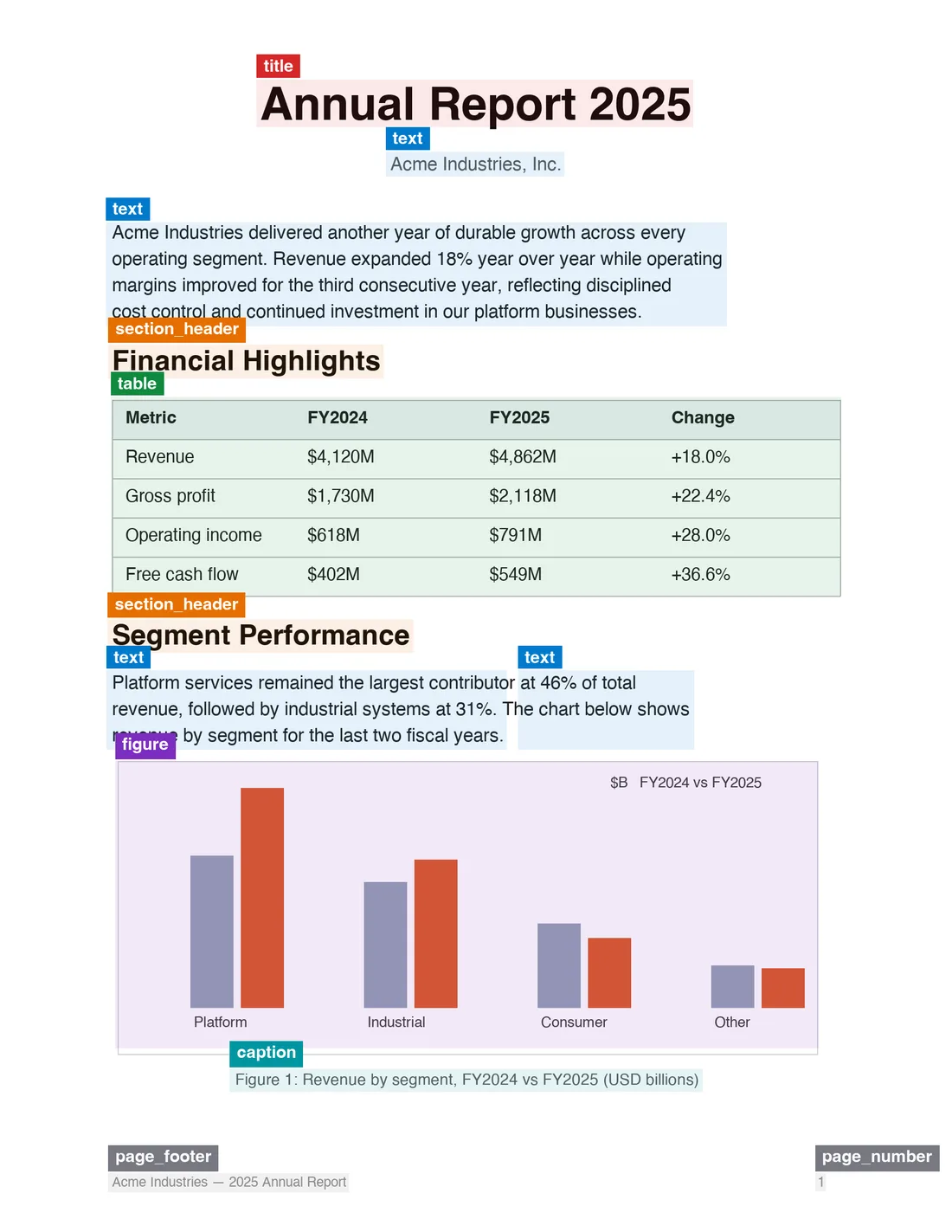
Layout blocks (PDF)#
Set blocks: true on the PDF parser and the document also
carries a blocks array: for every page, the typed layout blocks the parsing
engine detected, with geometry and provenance. This is the structured
counterpart to the markdown — use it for citation grounding, highlight
overlays, or auditing what a document contains. No additional cost.
Block fields#
| Field | Description |
|---|---|
id | Stable within a response: p<page>.b<index in reading order>. |
type | Block type: title, section_header, text, table, formula, figure, caption, page_number, page_header, page_footer. New types may appear over time. |
label | Raw layout-model label, passthrough for forward compatibility. |
bbox | [x0, y0, x1, y1] normalized 0–1 relative to the page. Multiply by width/height for pixel coordinates. null when the page has no known dimensions. |
content | The markdown fragment this block contributed. |
markdownSpan | [start, end) character offsets into the document markdown covering this block's fragment. null when post-processing rewrote the fragment. |
readingOrder | Position in the detected reading order. |
source | Pipeline path that produced the block (e.g. native_text, layout_ocr, tsr, formula_model). |
confidence | layout detection score (0–1) and ocr text confidence where the source provides one; null otherwise — never an invented aggregate. |
Grounding: from an answer back to the page#
markdownSpan links every block to the exact substring of the markdown it
produced. That makes citation grounding a lookup, not an inference: find the
quoted text in the markdown, find the block whose span covers that offset,
and you have the page number and bounding box — without ever asking a
language model for coordinates.
Structured JSON output#
Pass a JSON schema or prompt to extract structured data directly from the document:
PDF options#
All PDF behavior is controlled through the parsers option — on /parse and
/scrape alike:
| Property | Type | Default | Description |
|---|---|---|---|
type | "pdf" | (required) | Parser type. |
mode | "fast" | "auto" | "ocr" | "auto" | Parsing strategy — see below. |
maxPages | integer | — | Cap the number of pages to parse. |
pages | boolean | false | Also return per-page markdown. No additional cost. |
blocks | boolean | false | Also return layout blocks with bounding boxes. No additional cost. |
pageMarkers | boolean | false | Annotate page breaks in the document markdown with <!-- page N --> markers. No additional cost. |
Passing parsers: [] skips parsing entirely and returns the PDF as base64
(1 credit flat).
Parsing modes#
| Mode | Description |
|---|---|
auto | Attempts fast text-based extraction first, falls back to OCR when a page needs it. This is the default. |
fast | Text-based extraction only (embedded text). Fastest option, but fails on scanned or image-only pages rather than silently returning nothing. |
ocr | Forces OCR on every page. Use for scanned documents or when auto misclassifies a page. |
Supported formats#
Extensions: .html, .htm, .xhtml, .pdf, .docx, .doc, .docm, .odt, .ods, .odp, .rtf, .xlsx, .xls, .xlsm, .xlsb, .pptx, .ppt, .pptm, .epub, .csv.
See Document Parsing for how each format is converted.
Request reference#
The request is multipart/form-data with a required file part and an
optional options JSON part. options accepts a subset of scrape options:
formats: Array of output formats. Defaults to["markdown"]. Supported:markdown,html,rawHtml,links,images,summary, andjson(with a schema or prompt).onlyMainContent: Only return the main content of the document. Defaults totrue.includeTags/excludeTags: Tag-level inclusion or exclusion (HTML inputs).redactPII: Redact personally identifiable information from returned markdown.timeout: Request timeout in milliseconds. Defaults to30000, max300000.parsers: File-parser controls — see PDF options.
/parse does not support browser-only options like actions, waitFor, location, mobile, or change tracking.
Using Firecrawl through MCP? Use firecrawl_parse for local files. Local MCP can read the file directly when configured with FIRECRAWL_API_URL. Remote hosted MCP returns a short-lived upload command first, then parses the returned uploadRef. Public document URLs should still use /scrape.
Considerations#
- Maximum file size is 50 MB per request.
- PDF parsing is billed at 1 credit per page; the
pages,blocks, andpageMarkersoptions add no cost. - Parsing very large or scanned PDFs in
ocrmode may take longer — increasetimeoutor usemaxPagesto bound the work. - For batches of files, call
/parseper file in parallel; there is no batch upload variant.
Are you an AI agent that needs a Firecrawl API key? See firecrawl.dev/agent-onboarding/SKILL.md for automated onboarding instructions.